

[Dec-2021] 3V0-643 Exam Questions and Valid 3V0-643 Dumps PDF
3V0-643 Brain Dump: A Study Guide with Tips & Tricks for passing Exam
NEW QUESTION 11
Enable load balancing for the development environment allowing HTTPS access to the Dev-Web-01a and Dev-Web-02a servers.
Requirements:
vCenter: vcsa-01a.corp.local
Credentials: [email protected]
Self-signed certificate parameters:
Common Name: 192.168.5.100
Organization Name: ABC Medical
Organization Unit: IT
Locality: Palo Alto
State: CA
Country: United States
Message Algorithm: RSA
Key Size: 2048
Number of Days: 365
Web Servers: Dev-Web-01a, Dev-Web-02a
Use the secondary IP address of 192.168.5.100
New connections should consider current connections among all available members of the pool.
The web servers will not have SSL certificates installed. The web team has indicated that analytics based on source IP should be available.
Ensure all requirements have been met.
HOL LAB for Practice:
Load Balancer and other questions 7, 8, 9
See the explanation part for complete solution.
Answer:
Explanation:
SOLUTION:
Create Secondary address on Uplink Interface.
Generate CSR using the give details.
Enable Load-Balancer, create Profile, create Virtual Server.
Dev-Edge -> Manage -> Settings -> Interfaces -> Edit and add secondary IP address: 192.168.5.100


Create CSR as per given details from the question:
Dev-Edge -> Manage -> Settings -> Certificate -> Actions -> Generate CSR

Dev-Edge -> Manage -> Settings -> Certificate -> Actions -> Self Sign Certificate: Days = 365


Dev-Edge -> Manage -> Load Balancer -> Global Configuration -> Edit
Enable Load Balancer
Create Application Profile:
Check box for inser-forward-for-httpheader also below
Create new Pool:

Add both Web member servers:


Add Virtual Servers:

NEW QUESTION 12
You have been tasked with modifying an existing NSX API call to capture flow information for an organization. The existing API call is located on the ControlCenter desktop in a file name flowapi.txt.
The API call should be modified to collect Layer3 flow statistics between the dev-web-01a and the ControlCenter virtual machine.
Requirements:
vCenter: vcsa01a.corp.local
Credential: [email protected] / VMware1!
File location: flowapi.txt on the desktop of ControlCenter.
Modify and Save the existing API call to capture the requested information.
A REST Client has been added to Chrome and Firefox for this exercise.
Output the Response Body to a text file called apiresults.txt on the desktop of ControlCenter.
******************flowapi.txt***********************
https://<nsxmgr-ip>/api/2.1/app/flow/flowstats?contextId=datacenter-21&flowType=TCP_UDP&startTime
=0&endTime=
https://192.168.110.15/api/2.1/app/flow/flowstats?contextId=vm-26&flowType=Layer3&startTime=0&endT ime=1320917094000&
******************flowapi.txt***********************
HOL LAB for Practice:
See the explanation part for complete solution.
Answer:
Explanation:
SOLUTION:
Access the MOB by entering the following URL
https://vcsa-01a.corp.local/mob
[email protected]
VMware1!


Note down the vm number of dev-web-01a (in exam its like vm-216)
Then update flowapi.txt as
******************flowapi.txt***********************
https://<nsxmgr-ip>/api/2.1/app/flow/flowstats?contextId=datacenter-21&flowType=TCP_UDP&startTime
=0&endTime=
https://192.168.110.15/api/2.1/app/flow/flowstats?contextId=vm-216&flowType=Layer3
&startTime=0&endTime=1320917094000&startIndex=0&pageSize=2
******************flowapi.txt***********************
Then go to RESTClient.
GET
https://192.168.110.15/api/2.1/app/flow/flowstats?contextId=vm-216&flowType=Layer3
&startTime=0&endTime=1320917094000&startIndex=0&pageSize=2
SEND
Copy the content of "Response Body"
Paste in notepad and Save As "apiresults.txt"on the desktop of ControlCenter.


NEW QUESTION 13
Build a multi-tier network capable of supporting application virtual machines deployed across multiple vCenter instances.
Requirements:
vCenter: vcsa-01a.corp.local
Credentials: [email protected] / VMware1!
Resource Pools: Management and Edge Cluster 1A
The underlying physical network does not support multicast.
All new items created must have a prefix of "U" followed by their function name and a suffix of "New".
i.e. U-App-Tier-NEW.
Create a LS for HA management interface calle U-HA-VXLAN=NEW but do not enable HA on any of the edge devices deployed.
Deploy logical switches using separate subnets for the three tier application shared by both NSX Manager instances.
Deploy the required east-west routing component used across multiple vCenter instances for the multi-tier network.
Utilize a default gateway up to the Perimeter-Gateway02 (tenant router) from the east/west router.
Utilize a static route from the tenant router to reach the three tiers of the application.
Subnets for the tiers:
172.7.10.0/24 for the Web Tier.
172.17.20.1/24 for the App Tier.
172.17.30.0/24 for the Database Teir.
Use the first available IP address for the router on each of the tiers.
Subnet for the Transit VXLAN uplink from the application tier routing to the tenant router.
192.168.190.0/29
Uplink IP address of the application tier should be the first available IP address.
Downlink from the tenant router will use the second available IP addresses.
The password for new edge device(s) must be VMware1!VMware1!
Add all virtual machines with a prefix "universal-" to their respective segments.
Ensure all LIFs are reachable from ControlCenter.
HOL LAB for Practice:
See the explanation part for complete solution.
Answer:
Explanation:
SOLUTION:
universal transport zone
logical switches
U-HA-VXLAN-NEW
U-Transit-NEW
U-Web-Tier-NEW
U-App-Tier-New
U-DB-Tier-New
New DLR U-DLR-NEW
HA Interface - U-HA-VXLAN-NEW
Interface below
- U-Transit-NEW uplink 192.168.190.1
- U-Web-Tier-NEW internal 172.17.10.1
- U-App-Tier-NEW internal 172.17.20.1
- U-Db-Tier-NEW internal 172.17.30.1
Gateway
-U-Transit-NEW
Ip 192.168.190.2
PGW02 vnic4 U-Transit-NEW 192.168.190.2


Create 5 logical switches
U-Transit-NEW
U-Web-Tier-NEW
U-App-Tier-NEW

U-DB-Tier-NEW
Add VMs to relevant newly created Logical Switches.


No need


Create new Universal Logical (Distributed) Router:
U-DLR-NEW


U-Uplink-NEW(U-Transit-NEW)
Select U-Transit-NEW logical swicth here


Perimeter-Gateway-02

To-Universal-DLR
Select U-Transit-NEW


172.17.0.0/16
192.168.190.1
To-Universal-DLR
NEW QUESTION 14
The security team has submitted two requests to change or limit access in NSX for Site A's vCenter groups.
Requirements:
NSX Manager: nsxmgr-01a.corp.local
vCenter: vcsa-01a.corp.local
Credentials: [email protected] / VMware1!
Grant all members of vCenter group AuditTeam the minimal access necessary to view NSX Data Security policy configurations for all objects in Site A.
Grant all members of vCenter group ScanTeam the minimal access necessary to enable them to start and stop data security scans in Site A.
Ensure that the principles of least privilege are adhered to.
NOTE:
The Active Directory groups associated with the vCenter groups has already been preconfigured.
HOL LAB for Practice:
See the explanation part for complete solution.
Answer:
Explanation:
SOLUTION:
select Home. select administrator. select domain vsphere.local. select groups.
click + sign. enter group name AuditTeam click ok. do same for ScanTeam.

[email protected]


[email protected]


select datacenter A.
select manage select permission click on + Sign.
select Assign role read only. select all privileges click on Add
select AuditTeam and select ScanTeam. check propagate to childern. and click ok
NEW QUESTION 15
Management requires you to build a new logical topology for a new application that will include a hardware search appliance (HAS). The new application must contain a web tier and database tier on separate IP domains. Use the existing App01-DLR to complete the task.
Requirements:
vCenter: vcsa-01.corp.local
Credentials: [email protected] / VMware1!
vDS: vds-mgt-edge-a
Existing DLR Name: App01-DLR
New object prefix - App01
New object suffic - New
Create a new distributed port group for this task named vds-HSA-NEW.
The HAS must reside on the same IP subnet as the database.
The new application must contain a web tier and database tier on separate domains to be used at a future date.
Once deployed the HAS will be connected to a network with VLAN ID 500.
The proper physical switch ports for the uplinks have already been trunked to include VLAN 500.
VLANs configured in the compute racks are isolated to a single rack.
Any objects/items created must be named with a prefix of App01 and a suffix containing their function with NEW (for example: App01-Function-NEW) NOTE:
The hardware appliance and application virtual machines have not been deployed. Attempts to connectivity to the appliance will not succeed.
HOL LAB for Practice:
Bridging and other questions 7, 8, 9 and LAB - HOL-1925-02 Module 1
See the explanation part for complete solution.
Answer:
Explanation:
SOLUTION:
Step 1: From SiteA vCenter web client -> Networking -> Data Center SiteA -> create a new distribution port group named vds-HAS-NEW with VLAN ID 500 in vds-mgmt-edge.


Create LS on 192.168.110.15 = App01-WebTier-NEW
Create LS on 192.168.110.15 = App01-DBTier-NEW
NSX Edges -> App01-DLR
8) got NsX Edge and select App01-DLR. select Manage, select settings and click on + Sign (9) Enter interface name App01-Web-New, select type internal. select App01-Webtier-New LS Enter ip address 192.168.1.1/24. repeat the same steps for App01-DBtier-New but take ip addres
192.168.2.1 /24
Name: App01-Bridge-NEW
Logical Switch: App01-DBTier-NEW
Distributed Port Group: vds-HAS-NEW

(11) be sure under App01-DB-New the bridging is enable.
NEW QUESTION 16
The troubleshooting NSX deployment is growing and running out of compute capacity. An additional ESXi host is being added for VXLAN.
Host preparation has failed on esx-05a.corp.local on several attempts and the Compute Cluster 2A was left in an error state, determine and resolve the issue.
Requirements:
vCenter: vcsa-01a.corp.local
Credentials: [email protected] / VMware1!
Cluster: Compute Cluster 2A
IP Pool: Compute-2A
Transport Zone: Local-Transport-Zone-A
Esx-05a.corp.local IP information:
IP: 192.168.110.58
Netmask: 255.255.255.0
Gateway: 192.168.110.1
DNS: 192.168.110.10
1-Resolve deployment issue.
2-Prepare esx-05-a.corp.local for NSX in Compute Cluster 2A.
3-Ensure once the issue is resolved with the Compute Cluster 2A cluster, that it is connected to Local-Transport-Zone-A.
HOL LAB for Practice:
No Lab Module available
See the explanation part for complete solution.
Answer:
Explanation:
SOLUTION:
Follow the steps as:


NEW QUESTION 17
Configure a solution that extends an IP subnet between two data centers. The solution must ensure secure communication between two data centers. A standalone Edge Appliance has already been deployed and preconfigured in Site-B on the Compute Cluster.
Requirements:
vCenter: vcsa-01a.corp.local
Credentials: [email protected] / VMware1!
HQ Site Information:
Edge: Preimeter-Gateway-01
Logical Segment: Extend-LS-01
Connected to: vds-mgt-a_Trunk_Network
VPN Server settings: 192.168.100.3
Use the system generated certificate.
Preconfigured Standalone Edge Appliance: NSX l2vpn
Edge: 192.168.200.5
L2VPN Server Information:
Name: Peer-Site-NEW
Trunk ID = 10
User ID = peeruser1
Password = VMware1!
Encryption = AES256-SHA
The solution must ensure secure communication between the data centers.
NOTE:
No virtual machines are attached to the Logical switch Application-Tier-01, so there is no need to test communication across the tunnel.
Ensure that L2VPN server statistics shows Tunnel status of UP.
HOL LAB for Practice:
L2VPN and other questions 7, 8, 9
See the explanation part for complete solution.
Answer:
Explanation:
SOLUTION:
Add new Logical Switch: "Application-Tier-01"
NSX Edges -> Perimeter-Gateway-01 -> Manage -> Settings -> Interfaces -> edit vNIC4
Name: Extend-LS-01
Type: Trunk
Connected To:
Distributed Portgroup: vds-mgmt-a_trunknetwork
Add Sub Interface:


L2VPN Settings:
( select VPN under manage and enable L2VPN. click publish changes..
Then below
In actual exam, encryption is = AES256-SHA


(8) go to Vcenter b select datacenter - b. select Nsxl2vpn Edge under datacenter B click on Action select Power and click on Power on.
(9) check after few minutes the VPN Status by clicking Show L2VPN Statistic.
be sure its up. select PGW01 select VPN under Manage select L2VPN enable and click on publish changes.
NEW QUESTION 18
In the Dev environment, you have the application and database servers on separate networks created previously. Configure inbound only network security to allow only Dev application servers access to Dev database servers using MYSQL service port.
Requirements:
vCenter: vcsa-01a.corp.local
Credentials: [email protected] / VMware1!
Service Port: MYSQL
Networks: Dev-App-Tier-01-NEW and Dev-DB-Tier-01-NEW
Credentials for Dev VMs: root / VMware1!
This rule should be in its own "DB security-NEW" section.
Ensure inbound only network security allows Dev application servers access to Dev database servers.
This rule should not be prpogated to all NSX prepared clusters.
This rule should be created in a way that any new virtual machines on App and DB segments will be secured.
This rule should be created with the fewest rule(s) possible.
All other servers should be denied.
Ensure inbound security requirements are met.
HOL LAB for Practice:
See the explanation part for complete solution.
Answer:
Explanation:
SOLUTION:
Firewall -> add new Section:


Add new Rule under newly created Section:
Edit Rule Name:

Source = Dev-App-Tier-01-NEW (LS)
Destination = Dev-DB-Tier-01-NEW (LS)
Service = MySQL
Allow - In
Applied To: Logical Switch = Dev-DB-Tier-01-NEW
Add another rule = To Deny

Set destination: Logical Switch = Dev-DB-Tier-01-NEW

Bring to last the Deny rule:

NEW QUESTION 19
You have been tasked with enabling syslog on the NSX Manager (nsmgr-01a.corp.local) and all NSX Controllers.
Requirements:
vCenter: vcsa-01a.crop.local
NSX Manager A: nsxmgr-01a.corp.local
Password: VMware1!
Syslog Information:
Server: 192.168.110.24
Port: 514
Protocol: UDP
Header Information:
Authentication: Basic
Content-Type: application/xml
Enable syslog for NSX Manager.
Enable syslog for NSX controllers.
HOL LAB for Practice:
See the explanation part for complete solution.
Answer:
Explanation:
SOLUTION:

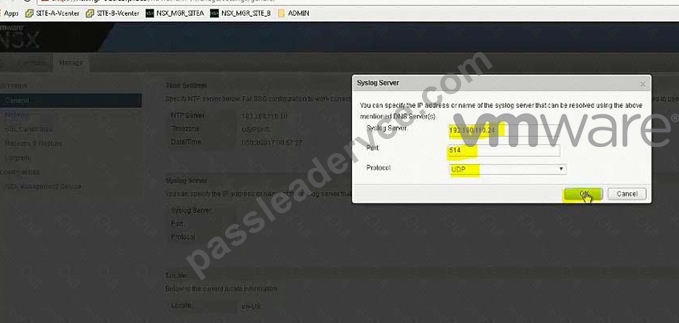

Open API guide from desktop, scroll down for Controller Syslog URI.
In exam search function doesn't work so you should be familiar with the document.
In exam, user hostname instead of IP address (IP address wont work).
For version (2.0), also check API guide version, it could be 2.1 or 2.0 GET
https:// nsxmgr-01a.corp.local/api/2.0/vdn/controller/controller-1/syslog

Copy the required parameters from API guide or memorize.


Verify
Do the same for controller-2
Do the same for controller-3
NEW QUESTION 20
......
VMware 3V0-643: VMware Certified Advanced Professional 6 - Network Virtualization Deployment (VCAP6-NV Deploy) Exam Certified Professional salary
The estimated average salary of VMware 3V0-643 Certified Advanced Professional 6 - Network Virtualization Deployment (VCAP6-NV Deploy) certified professional is listed below:
- Europe: 88,000 EURO
- England: 79,000 POUND
- United States: 105,000 USD
- India: 7,768,000 INR
3V0-643 Exam Questions: Free PDF Download Recently Updated Questions: https://www.passleadervce.com/VCAP-NV-Deploy-2020/reliable-3V0-643-exam-learning-guide.html